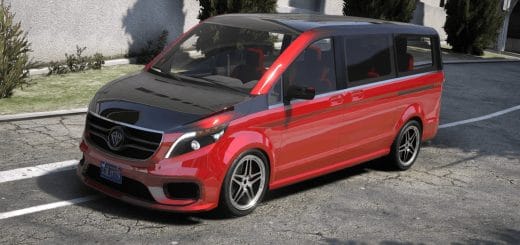
Benefector XLS Monarch V1.1.1

GTA 5 Mods |
Benefector XLS Monarch V1.1.1


Installation:
1. copy mxls folder to:
X:\Grand Theft Auto V\update\x64\dlcpacks

2. Use OpenIV go to:
X:\Grand Theft Auto V\update\update.rpf\common\data\dlclist.xml
right click edit, add new line

dlcpacks:/mxls/

Car Spawn Names: mxls

Features:
-2 color different color
-Star ceiling and door lightings [Dasboard color]
– New rims
-Headlight New


Author: FoxS,Z3us

Something not working? Check the comments for helpful advice and share any new issues you discover.


Download


Useful Information: How to install Grand Theft Auto 5 Mods | Grand Theft Auto 5 System Requirements | Grand Theft Auto 5 News

Leave a Reply

Your email address will not be published. Required fields are marked *